
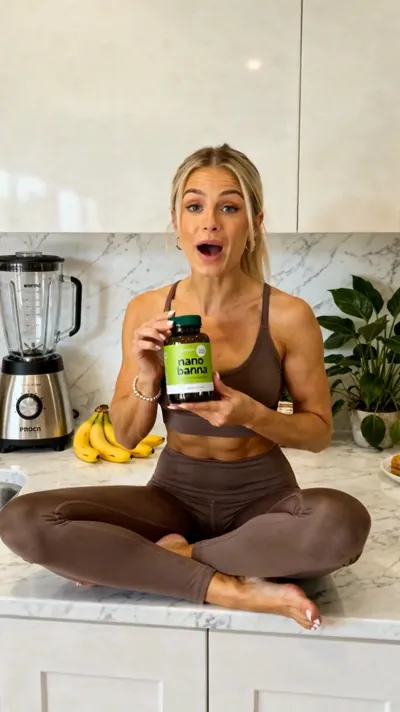
A UGC ad for your product
Make a 15 second UGC ad for my greens powder. A woman in her kitchen holds the tub and talks like a real customer. Add captions, 9:16 for TikTok.
create_video() get_job()
 VidGuy MCP Server
 Claude with VidGuy MCP.
Ask your agent for a UGC ad, a carousel or a week of posts. VidGuy makes it and posts it to TikTok, Instagram and YouTube.


 ★★★★★Works with Claude, ChatGPT, Cursor, Codex and more
No link to paste and no developer mode. Add the plugin, sign in, and ask for a video.
 Add VidGuy in ChatGPT
Go to chatgpt.com/plugins and search for VidGuy.
Find VidGuy in Plugins or use the button. Click Add, then sign in with your VidGuy account.
Describe the video you want. ChatGPT makes it with VidGuy right in the chat.
Start creatingReal prompts next to the videos they made. Copy one, or open it in Claude and make your own.
Make a 15 second UGC ad for my greens powder. A woman in her kitchen holds the tub and talks like a real customer. Add captions, 9:16 for TikTok.
create_video() get_job()
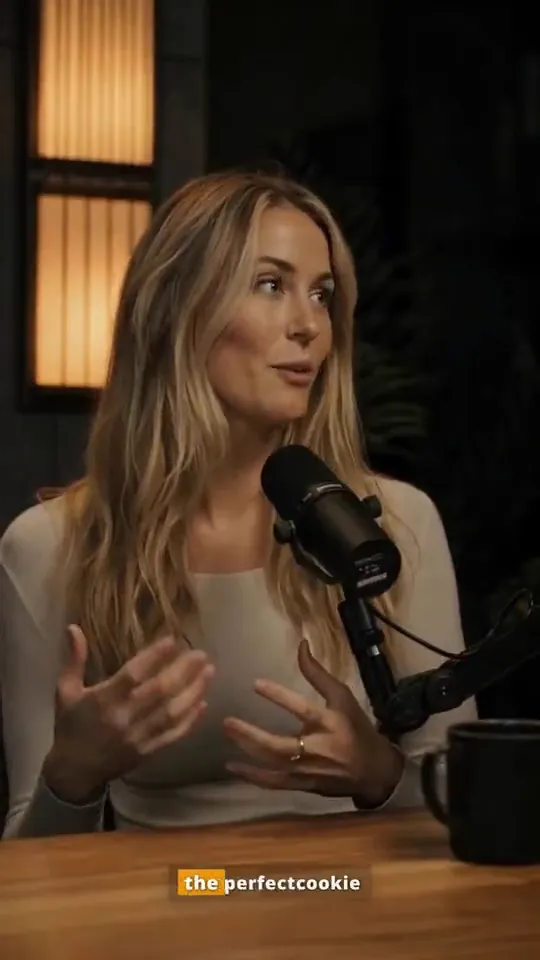
Make a podcast style clip of a host sharing her grandma's cookie secret. Warm studio light and word by word captions.
create_video() get_job()

Make a short 3D animated story. A grumpy blueberry in a suit asks a lemon chef for cooking lessons. Cute 3D cartoon look, funny ending.
create_ai_story() get_job()



 TikTok carousel
Make a TikTok photo carousel with the Ranked list template: business ideas that will retire your parents. Cross out the weak ones, tick the winner, then post it.
list_carousel_templates() create_tiktok_carousel()

Take the runway walk from the Remix library and swap the model for my AI influencer. Keep the walk, the wings and the camera.
swap_import_character() create_character_swap()

Generate an 8 second anime shot of a woman in a lavender kimono on a cliff at night. Crescent moon, calm sea, slow push in. Use Seedance 2.0.
list_studio_models() seedance_generate_video()

Create a realistic AI influencer called Kammy, early 20s with long dark hair. Then make her first clips, starting with a mirror selfie in a black tank top and jeans.
create_influencer() build_influencer_vault()

Make a UGC ad for my app. A woman in pajamas in her bathroom holds up her phone, shows my app's chat screen to the camera and says why she loves it. 9:16 for TikTok.
create_video() get_job()
Go deeper: character swap and the VidGuy API.
Any client that speaks MCP can use VidGuy. Pick yours for a step by step setup guide.
Your agent picks the right tool for the job, from a 15 second UGC ad to a full week of posts.
Your agent works with your credits, so the guard rails are built in.
Connect your accounts once. Your agent posts right away, at a set time or into your queue.
Three steps, about a minute. No code.
Paste https://www.vidguy.ai/api/mcp into your agent's connector settings. In Claude that's Settings → Connectors.
Approve VidGuy with your account. Your agent gets access to your brands, media and social accounts.
Say what you want in plain English. Your agent makes it, shows you the result and posts it when you say go.
Work in the terminal? Use the VidGuy CLI and skill
Starter, Pro and Scale all include the MCP server. Pick the plan that fits today. Cancel anytime.
Starter
$588/yr $420/yr billed yearly
For one brand building a consistent weekly presence.
Pro
$1188/yr $828/yr billed yearly
For growing teams publishing every day across up to three brands.
Scale
$4788/yr $3348/yr billed yearly
For agencies and multi-brand operators scaling production.
MCP (Model Context Protocol) is an open standard that lets AI agents use outside tools. An MCP server is the bridge between the agent and those tools. The VidGuy MCP server gives your agent more than 100 tools to make videos, images and social posts.
UGC ads, talking head videos, faceless videos, 3D animated stories, slide carousels, TikTok photo carousels, memes, voiceovers and dubs. It can also edit your own footage, swap characters and post the result to your social accounts.
Any client that supports remote MCP servers. That includes Claude, ChatGPT, Claude Code, Codex, Cursor, Gemini CLI, Grok, OpenClaw and Hermes. Every one of them has a setup guide on this page.
In Claude, open Settings → Connectors and add a custom connector. Name it VidGuy, paste https://www.vidguy.ai/api/mcp and sign in with your VidGuy account. Then ask Claude to make a video.
Yes. VidGuy is a ChatGPT plugin. Go to chatgpt.com/plugins, search for VidGuy, click Add and sign in. Then mention @VidGuy in any chat. If your workspace turns plugins off, add https://www.vidguy.ai/api/openai/mcp as a custom connector instead.
The MCP server comes with every paid plan, starting with Starter at $49 a month. Each video or image uses credits from your plan, and your agent can check the cost before it starts.
Your agent can price a job before it runs it, and credits come back on their own if a job fails. Claude and most other clients also ask before they use a tool, unless you tell them to stop asking.
Most videos are ready in 2 to 5 minutes. Your agent gets a job ID right away and checks back, so you can keep chatting while it renders.
Yes. Connect your accounts in VidGuy once. Your agent can then post to TikTok, Instagram, YouTube, LinkedIn and Pinterest right away, at a set time or into your posting queue.
Use the MCP server in chat apps like Claude, ChatGPT and Cursor. Use the CLI or the skill in terminal agents like Claude Code, Codex, OpenClaw and Hermes. All three reach the same VidGuy tools.
One link gives your agent a whole content team. It takes about a minute to connect.


